
Fitness & Wellness
Serving Wentworth, MassArt, & MCPHS Students
The Department of Fitness and Wellness fosters and promotes a healthy learning environment for students, faculty, and staff by implementing innovative and exciting opportunities that encourage intellectual, physical, social, and spiritual well-being. We strive to provide positive co-curricular activities and experiences designed to enrich lives, develop talents, and offer an arena for discovery and self-exploration.
Find us in the Flanagan Campus Center at Beatty Hall on the Wentworth Institute of Technology campus.

Facility Hours
Fall & Spring Hours - Schumann
Monday-Thursday: 6:00 AM - 11:00 PM
Friday: 6:00 AM - 9:00 PM
Saturday: 11:00 AM - 7:00 PM & Sunday 11:00 AM - 9:00 PM
Fall & Spring Hours - Tansey Gym*
Monday - Friday: 10:00 AM - 4:00 PM
Saturday: 12:00 PM - 6:00 PM
Sunday: 12:00 PM - 8:00 PM
Fall & Spring Hours - Tansey Weight Room*
Monday - Friday: 10:00 AM - 4:00 PM
Saturday: 12:00 PM - 6:00 PM
Sunday: 12:00 PM - 8:00 PM
Summer Hours - Schumann
Monday - Friday: 6:00 AM - 9:00 PM
Saturday & Sunday: 11:00 AM - 7:00 PM
Summer Hours - Tansey Gymnasium
Monday - Friday: Closed
Saturday & Sunday: Closed
Summer Hours - Tansey Weight Room
Monday - Friday: Closed
Saturday & Sunday: Closed
Summer Hours - Sweeney Field
Monday - Friday: 10:00 AM - 2:00 PM
Saturday & Sunday: Closed
*Hours dependent on Athletic events
Fitness Facilities
With amenities that one comes to expect from a first-class facility, including locker rooms and showers, Wentworth Fitness and Wellness also offers over 50 pieces of the latest technology in cardiovascular and strength equipment from top-of-the-line manufacturers like Cybex, Matrix, and Stairmaster.

Club Sports
Wentworth’s Club Sports teams provide a safe but competitive recreational outlet for students at WIT. Our teams practice weekly and travel locally to compete with other club sports teams.

How do I access the fitness spaces at Wentworth?
In the Fall of 2026, FitWell transitioned from it's previous software to DSE Rec. This new platform allows students, faculty, and staff to access our facilities simply by using their phone.
-
How do I access DSE as a Wentworth community member?
To access our facilities, you are going to need to download an app to your phone. Here's how you get that done:
- On your LAPTOP, go to this website: DSE Dashboard
- Once on the dashboard, click "Log In" at the top right.
- When the pop-up appears, click "University Account", and you will be logged in with your WIT credentials.
Now that you've logged in, you are going to need your phone to complete the process.
- On your laptop, click your name in the top right of the screen, and select "Manage Account".
- When the Manage Account page opens, select "Mobile App".
- Scan the QR code with your phone, and download the DSERec app.
- On your laptop, click "Connect New Device"
- You will see a pop up on your laptop that will provide a school code and an activation code. Enter that information on your phone.
The next time you head to a class, the fitness center, or the basketball courts, open the app and hit "Barcode ID" in the bottom right. Now you no longer need your ID to enter our spaces!
-
How do I create an account if I'm a Mass Art or MCPHS community member?
Your process requires just a few more steps, but you've got this! Ready?
- On your LAPTOP, go to this website: DSE Dashboard
- Click "Log In"
- Click "Local Account", and then "Forgot Password"
- When requested, enter in your SCHOOL email address. (For MCPHS students, use the email address that is NOT your M# email address. It should be in this format: abcde1@stu.mcphs.edu) For Mass Art, it would be your @massart.edu address.
- Follow the steps via your school email to create a new password for DSE.
Now that you've logged in, you are going to need your phone to complete the process.
- On your laptop, click your name in the top right of the screen, and select "Manage Account".
- When the Manage Account page opens, select "Mobile App".
- Scan the QR code with your phone, and download the DSERec app.
- On your laptop, click "Connect New Device"
- You will see a pop up on your laptop that will provide a school code and an activation code. Enter that information on your phone.
The next time you head to a class, the fitness center, or the basketball courts, open the app and hit "Barcode ID" in the bottom right. Now you no longer need your ID to enter our spaces!
Having Issues? Email us: fitwell@wit.edu
-
Do you have lockers available?
We have storage cubbies where you may keep your belongings while you work out. In addition to the storage cubbies, there are a limited number of lockers available in each locker room. These lockers are for DAY USE ONLY!
-
Do you have personal trainers?
Coming soon!
-
Are there places where can I shower?
Shower facilities are available in the men’s and women’s locker rooms located inside the Schumann Fitness Center. All showers are wheelchair accessible, and towel service is available.
-
Do you allow guests?
Due to space constraints and the popularity of Fitness and Recreation, guests are not currently allowed.
-
Do I have to pay to take Group Exercise classes?
All Group Exercise classes are free, but you will need to have DSE on your phone in order to check-in for class.
-
I forgot my shampoo, and I need to shower before class.
Don’t worry, FitWell offer shampoo and body wash for emergencies just like this. We even have a hairdryer and hair elastics should you need one while running on the treadmill.
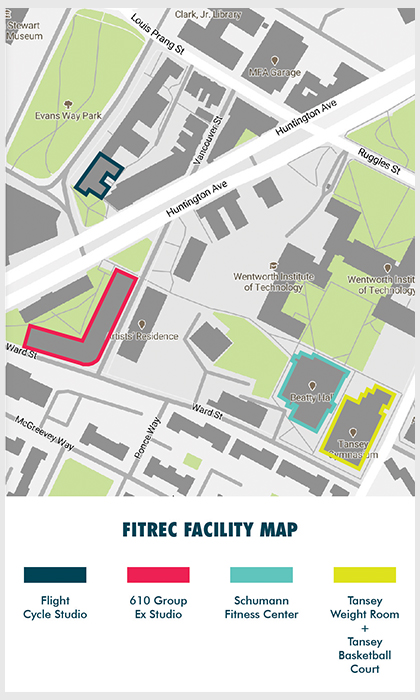
Where to Find Us
We are located on the main floor of the Flanagan Campus Center in Beatty Hall.
Please view the map.